> ## Documentation Index
> Fetch the complete documentation index at: https://developers.hubspot.jp/docs/llms.txt
> Use this file to discover all available pages before exploring further.

# ブログテンプレート

> ブログ リスト ページ テンプレートとブログ記事テンプレートは、ウェブサイト上でのブログのレイアウトをカスタマイズするために使用できます。 

export const SupportedProducts = ({marketing, sales, service, cms, marketingLevel, salesLevel, serviceLevel, cmsLevel}) => {
  const translations = {
    header: "サポートされる製品",
    description: "次のいずれかの製品またはそれ以上が必要です。",
    productNames: {
      marketing: "Marketing Hub",
      sales: "Sales Hub",
      service: "Service Hub",
      cms: "Content Hub"
    },
    tiers: {
      free: "無料ツール",
      starter: "Starter",
      professional: "Professional",
      enterprise: "Enterprise"
    }
  };
  const translateTier = tier => {
    if (!tier) return '';
    const lowerTier = tier.toLowerCase();
    return translations.tiers[lowerTier] || tier;
  };
  const products = [{
    name: marketing ? translations.productNames.marketing : '',
    level: translateTier(marketingLevel),
    icon: "https://mintlify-assets.b-cdn.net/Icons/marketing-bolt.svg",
    alt: "Marketing Hub"
  }, {
    name: sales ? translations.productNames.sales : '',
    level: translateTier(salesLevel),
    icon: "https://mintlify-assets.b-cdn.net/Icons/sales-star.svg",
    alt: "Sales Hub"
  }, {
    name: service ? translations.productNames.service : '',
    level: translateTier(serviceLevel),
    icon: "https://mintlify-assets.b-cdn.net/Icons/service-heart.svg",
    alt: "Service Hub"
  }, {
    name: cms ? translations.productNames.cms : '',
    level: translateTier(cmsLevel),
    icon: "https://mintlify-assets.b-cdn.net/Icons/content-play.svg",
    alt: "Content Hub"
  }].filter(product => product.name && product.level);
  if (products.length === 0) return null;
  return <div>
      <div className="text-sm mb-2">{translations.description}</div>
      <div className={`grid ${products.length === 1 ? 'grid-cols-1' : 'grid-cols-2'} gap-1.5`}>
        {products.map((product, index) => <div key={index} style={{
    display: 'flex',
    alignItems: 'center'
  }}>
            <img src={product.icon} alt={product.alt} className="w-3.5 h-3.5 mr-1.5 mt-2.5 mb-2.5 flex-shrink-0 align-middle" />
            <span className="font-medium mr-1 text-sm">{product.name} -</span>
            <span className="text-sm">{product.level}</span>
          </div>)}
      </div>
    </div>;
};

<Accordion title="サポートされる製品" defaultOpen="true" icon="cubes">
  <SupportedProducts marketing={true} marketingLevel="professional" cms={true} cmsLevel="starter" />
</Accordion>

HubSpotのブログは、ブログ リスト ページと個別のブログ記事で構成されます。ブログ リスト ページ テンプレートは個別のブログ記事をリスト化するために使用されるほか、執筆者およびタグのリストページをレンダリングするためにも使用されます。リストページ用とブログ記事用にそれぞれ個別のテンプレートを作成することも、両方を含めて全てのページをレンダリングする共通のテンプレートを作成することも可能です。

この記事では、ブログテンプレートのマークアップ、テンプレートを構成する要素、そしてカスタマイズのオプションについて説明します。

## リストページと記事の共通テンプレートを作成する

リストページと記事の両方をレンダリングする共通のテンプレートを作成するには、テンプレートファイルの先頭に`templateType: blog`[アノテーション](/cms/start-building/building-blocks/templates/html-hubl-templates#template-annotations)を追加します。共通のテンプレートを両方のレンダリングに使用する場合は、[if文](/cms/reference/hubl/if-statements)を使用して、ユーザーがリストページと個別の記事のどちらを表示しているかを評価します。デザインマネージャーの[ドラッグ＆ドロップレイアウト](/cms/start-building/building-blocks/drag-and-drop/drag-and-drop-templates)を使用している場合、ブログ コンテンツ モジュール ボタンのUIにこの`if`文が組み込まれます。

`if is_listing_view`ステートメントを使用すると、記事とリストのコードを別々に書くことができます。

```hubl theme={null}
{% if is_listing_view %}
    Markup for blog listing template
{% else %}
    Markup for blog post template
{% endif %}
```

## リストページ用と記事用に個別のテンプレートを作成する

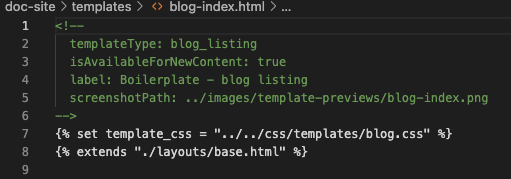
[ブログ記事](https://developers.hubspot.jp/docs/guides/cms/content/templates/overview#blog-post)と[リストページ](https://developers.hubspot.jp/docs/guides/cms/content/templates/overview#blog-listing)に別々のテンプレートを用意することも可能です。個別のテンプレートを使用することにより、開発者はコードがすっきりして読みやすく、コンテンツ作成者はテンプレートを選びやすくなります。共通のテンプレートでは先頭に`templateType: blog`アノテーションを挿入しますが、各ページ用に個別のテンプレートを作成する場合はそれに代わり、テンプレートの先頭にそれぞれ以下の[アノテーション](https://developers.hubspot.jp/docs/guides/cms/content/templates/overview#template-types)を追加します。

* **ブログ記事テンプレート**`templateType: blog_post`
* **ブログ リスト テンプレート**`templateType: blog_listing`

<Frame>
  <img src="https://www.hubspot.jp/hubfs/Knowledge_Base_2021/Developer/template-annotation-blog-listing.png" alt="template - annotation - blog - listing" />
</Frame>

記事テンプレートとリスト ページ テンプレートを別々に作成する場合、`is_listing_view`チェックは必要ありません。代わりに、アカウントのブログ設定で[個別のテンプレートを手動で選択します](https://knowledge.hubspot.com/ja/blog/manage-your-blog-template-and-settings#select-your-blog-templates)。

また、[共通のブログテンプレートを、リストページ用もしくは記事用のテンプレートに移行する](https://developers.hubspot.jp/docs)ことも可能です。

### リスト ページ テンプレート

テンプレートに`templateType: blog_listing`アノテーションを挿入すると、[［ブログ設定］の下のセクション](https://knowledge.hubspot.com/ja/blog/manage-your-blog-template-and-settings)でリストページ用のテンプレートとして選択できるようになります。コンテンツ作成者はこのテンプレートタイプを使用して、ページエディター内でリストページを編集することも可能です。さらに、テンプレートに[ドラッグ＆ドロップエリア](https://developers.hubspot.jp/docs/guides/cms/content/templates/drag-and-drop/overview)も含めることで、他のCMSページと同様にページエディターにおけるモジュールの追加や削除が可能になります。ドラッグ＆ドロップエリアの追加例に関して、詳しくは[CMSボイラープレートのブログテンプレート](https://github.com/HubSpot/cms-theme-boilerplate/pull/349)をご覧ください。

記事のリストは、ブログ記事を反復処理する[forループ](/cms/reference/hubl/loops)によって生成されます。`contents`は、そのブログに含まれる全ての記事を含む事前定義されたコンテンツシーケンスです。

```hubl theme={null}
{% for content in contents %}
    <div class="post-item">
        Post item markup that renders with each iteration.
    </div>
{% endfor %}
```

<Info>
  ブログ リスト ページ テンプレートの全てのテキスト文字列は、フィールドで制御することをお勧めします。これにより、[多言語](/cms/start-building/features/multi-language-content)ブログの作成が容易になり、コンテンツ作成者の操作性が向上します。
</Info>

## ブログ リスト ページ モジュールを作成する

コンテンツ作成者がモジュールをブログ リスト ページ内コンテンツの周囲（側面や上下など）に配置することを許可できます。これを有効にするには、[ブログリストのforループ](/cms/start-building/building-blocks/templates/blog#blog-listing-for-loop)を使用したブログ リスト モジュールを作成することをお勧めします。例については、[CMSボイラープレートのブログ リスト ページ モジュール](https://github.com/HubSpot/cms-theme-boilerplate/tree/main/src/modules/blog-listings.module)をご参照ください。[](https://github.com/HubSpot/cms-theme-boilerplate/tree/main/src/modules/blog-listings.module)

HubSpotは、サマリーの表示やキービジュアルを使用するための[ブログ設定](https://knowledge.hubspot.com/ja/blog/manage-your-blog-template-and-settings#select-your-blog-templates)を提供していますが、これらの機能をモジュールに組み込むこともできます。モジュールへの組み込みにより、コンテンツ作成者はブログの設定ページへ切り替えることなく、ページエディター内で必要な機能を使用できるようになります。

## ブログ執筆者、タグ、シンプル リスト ページ

HubSpotブログにはブログ記事とブログ リスト ページに加えて、ブログ執筆者用のページ、ブログ記事のタグ用のページ、シンプル リスト ページもあります。こうした追加ページは、ブログ リスト ページと同じテンプレートを使用してコンテンツが表示されます。

<Info>
  リストページのテンプレートはブログ執筆者、タグ、簡単なリストページでも共有されるため、テンプレートに公開された更新内容もこれらのページに適用されます。
</Info>

追加ページのレイアウトを個別に構成するには、`if`文を使用して、各タイプのページのコンテンツを条件付きでレンダリングします。

### Ifblog\_author

標準的なHubSpotブログ リスト ページのマークアップには、`if blog_author`ステートメントが含まれます。このステートメントは、執筆者が公開した全ての記事を一覧にした執筆者の個別ページを表示する際に［true］と評価されます。ボイラープレートテンプレートには、執筆者の名前、プロフィール、およびソーシャル メディア アカウントが含まれています。

```hubl theme={null}
{% if blog_author %}
  <div class="blog-header">
    <div class="blog-header__inner">
      {% if blog_author.avatar %}
      <div class="blog-header__author-avatar" style="background-image: url('{{ blog_author.avatar }}');"></div>
      {% endif %}
      <h1 class="blog-header__title">{{ blog_author.display_name }}</h1>
      <h4 class="blog-header__subtitle">{{ blog_author.bio }}</h4>
      {% if blog_author.has_social_profiles %}
        <div class="blog-header__author-social-links">
          {% if blog_author.website %}
            <a href="https://developers.hubspot.jp/docs{{ blog_author.website }}" target="_blank">
              {% icon name="link" style="SOLID" width="10" %}
            </a>
          {% endif %}
          {% if blog_author.facebook %}
            <a href="https://developers.hubspot.jp/docs{{ blog_author.facebook }}" target="_blank">
              {% icon name="facebook-f" style="SOLID" width="10" %}
            </a>
          {% endif %}
          {% if blog_author.linkedin %}
            <a href="https://developers.hubspot.jp/docs{{ blog_author.linkedin }}" target="_blank">
              {% icon name="linkedin-in" style="SOLID" width="10" %}
            </a>
          {% endif %}
          {% if blog_author.twitter %}
            <a href="https://developers.hubspot.jp/docs{{ blog_author.twitter }}" target="_blank">
              {% icon name="twitter" style="SOLID" width="10" %}
            </a>
          {% endif %}
        </div>
      {% endif %}
    </div>
  </div>
{% else %}
```

### If tag

`if tag`ステートメントを使用すると、ブログのトピックページにのみコードをレンダリングできます。訪問者がウェブサイト上でブログトピックをクリックすると、その値が表示されます。以下の例は、ページタイトル変数を使用してタグ リスト ページ上部にタグ名を自動出力するスニペットです。

```hubl theme={null}
{% if tag %}
    <h3>Posts about {{ page_meta.html_title|split(" | ")|last }}</h3>
{% endif %}
```

### If not simple\_list\_page

ブログ記事の一覧を表示するためにレンダリングされるブログ リスト ページには、標準のリストページとシンプル リスト ページの2種類があります。

* 標準のリストページでは、記事リストのブログ設定で指定された記事の数だけレンダリングが反復し、それに応じてページ番号も付与されます。
* シンプル リスト ページは全ての記事の一覧で、ページ番号には対応していません。シンプル リスト ページは、[ブログ設定の記事数制限](/cms/start-building/introduction/developer-environment/website-settings#number-of-posts-per-listing-page)の影響を受けることなく、通常は直近200件のブログ記事へのリンクが格納されます。シンプル リスト ページのアドレスは、ブログURLのパスの末尾に`/all`を追加したものです。

`if not simple_list_page`ステートメントを使用して、シンプル リスト ページと標準のリストページのどちらをレンダリングするかを指定できます。このステートメントを簡略化したものを以下でご参照ください。

<Info>
  この`if`文ではロジックが反転している点にご注意ください。つまり、`else`でシンプル リスト ビューを定義しています。必要に応じて、代わりに[unless文](/cms/reference/hubl/if-statements#unless-statements)を使用することもできます。
</Info>

```hubl theme={null}
{% if not simple_list_page %}
    Iterated post markup for regular listing
{% else %}
    <h2 class="post-listing-simple"><a href="https://developers.hubspot.jp/docs{{content.absolute_url}}">{{ content.name }}</a></h2>
{% endif %}
```

## リストのページ送り

ブログ リスト ページではページ番号が自動生成されます。リスト ページ テンプレートには、訪問者がブログ記事内でページを簡単に切り替えられるようにするロジックを含めることが可能です。[ボイラープレートのブログ](https://boilerplate.hubspotcms.com/blog)では、[次のマークアップ](https://github.com/HubSpot/cms-theme-boilerplate/blob/main/src/modules/blog-pagination.module/module.html)を使って数値によるシンプルなページ送りを実現しています。

```hubl theme={null}
{% if contents.total_page_count > 1 %}
<div class="blog-pagination">
    {% set page_list = [-2, -1, 0, 1, 2] %}
    {% if contents.total_page_count - current_page_num == 1 %}{% set offset = -1 %}
    {% elif contents.total_page_count - current_page_num == 0 %}{% set offset = -2 %}
    {% elif current_page_num == 2 %}{% set offset = 1 %}
    {% elif current_page_num == 1 %}{% set offset = 2 %}
    {% else %}{% set offset = 0 %}{% endif %}

    <a class="blog-pagination__link blog-pagination__prev-link {{ "blog-pagination__prev-link--disabled" if !last_page_num }}" href="https://developers.hubspot.jp/docs{{ blog_page_link(last_page_num) }}">
    {% icon name="chevron-left" style="SOLID", width="13", no_wrapper=True %}
    Prev
    </a>
    {% for page in page_list %}
    {% set this_page = current_page_num + page + offset %}
    {% if this_page > 0 and this_page <= contents.total_page_count %}
        <a class="blog-pagination__link blog-pagination__number-link {{ "blog-pagination__link--active" if this_page == current_page_num }}" href="https://developers.hubspot.jp/docs{{ blog_page_link(this_page) }}">{{ this_page }}</a>
    {% endif %}
    {% endfor %}
    <a class="blog-pagination__link blog-pagination__next-link {{ "blog-pagination__next-link--disabled" if !next_page_num }}" href="https://developers.hubspot.jp/docs{{ blog_page_link(current_page_num + 1) }}">
    Next
    {% icon name="chevron-right" style="SOLID", width="13", no_wrapper=True %}
    </a>
</div>
{% endif %}
```

## ボイラープレートマークアップ

以下で、ブログ記事とブログ リスト ページ テンプレートのボイラープレートマークアップをご覧ください。各セクションに記載されているように、GitHubのCMSボイラープレートでこのマークアップを表示することもできます。

### 記事テンプレートマークアップ

ブログ内の全てのブログ記事は、1つのブログテンプレートによって生成されます。 `Content`は、リクエストされたブログ記事に関する情報を含む事前定義されたデータオブジェクトです。[ボイラープレート記事](https://boilerplate.hubspotcms.com/blog)は、[次のマークアップ](https://github.com/HubSpot/cms-theme-boilerplate/blob/main/src/templates/blog-post.html)を使ってレンダリングされます。

```hubl theme={null}
<div class="content-wrapper">
  <div class="blog-post">
    <h1>{{ content.name }}</h1>
    <div class="blog-post__meta">
      <a href="https://developers.hubspot.jp/docs{{ blog_author_url(group.id, content.blog_post_author.slug) }}">
        {{ content.blog_post_author.display_name }}
      </a>
      <div class="blog-post__timestamp">
        {{ content.publish_date_localized }}
      </div>
    </div>
    <div class="blog-post__body">
      {{ content.post_body }}
    </div>
    {% if content.tag_list %}
    <div class="blog-post__tags">
      {% icon name="tag" style="SOLID" %}
      {% for tag in content.tag_list %}
        <a class="blog-post__tag-link" href="https://developers.hubspot.jp/docs{{ blog_tag_url(group.id, tag.slug) }}">{{ tag.name }}</a>{% if not loop.last %},{% endif %}
      {% endfor %}
    </div>
    {% endif %}
  </div>
  <div class="blog-comments">
    {% module "blog_comments" path="@hubspot/blog_comments", label="Blog Comments" %}
  </div>
</div>
```

また、ブログ記事の執筆者情報も`content`contentデータの中に含まれます。

```hubl theme={null}
<img alt="{{ content.blog_post_author.display_name }}" src="{{ content.blog_post_author.avatar }}">
<h3>Written by <a class="author-link" href="https://developers.hubspot.jp/docs{{ blog_author_url(group.id, content.blog_post_author.slug) }}">{{ content.blog_post_author.display_name }}</a></h3>
<p>{{ content.blog_post_author.bio }}</p>
{% if content.blog_post_author.has_social_profiles %}
    <div class="hs-author-social-section">
        <div class="hs-author-social-links">
            {% if content.blog_post_author.facebook %}
                <a href="https://developers.hubspot.jp/docs{{ content.blog_post_author.facebook }}" target="_blank" class="hs-author-social-link hs-social-facebook">Facebook</a>
            {% endif %}
            {% if content.blog_post_author.linkedin %}
                <a href="https://developers.hubspot.jp/docs{{ content.blog_post_author.linkedin }}" target="_blank" class="hs-author-social-link hs-social-linkedin">LinkedIn</a>
            {% endif %}
            {% if content.blog_post_author.twitter %}
                <a href="https://developers.hubspot.jp/docs{{ content.blog_post_author.twitter }}" target="_blank" class="hs-author-social-link hs-social-twitter">Twitter</a>
            {% endif %}
            {% if content.blog_post_author.google_plus %}
                <a href="https://developers.hubspot.jp/docs{{ content.blog_post_author.google_plus }}?rel=author" target="_blank" class="hs-author-social-link hs-social-google-plus">Google+</a>
            {% endif %}
        </div>
    </div>
{% endif %}
```

### リスト ページ テンプレートのマークアップ

[ボイラープレート ブログ リスト ページ](https://boilerplate.hubspotcms.com/blog)のコンテンツのforループは、[次のマークアップ](https://github.com/HubSpot/cms-theme-boilerplate/blob/main/src/templates/blog-index.html)によってレンダリングされます。

```hubl theme={null}
{% for content in contents %}
    {# On the blog homepage the first post will be featured above older posts #}
    {% if (loop.first && current_page_num == 1 && !topic) %}
    <div class="blog-index__post blog-index__post--large">
        <a class="blog-index__post-image blog-index__post-image--large"
        {% if content.featured_image %}
            style="background-image: url('{{ content.featured_image }}')";
        {% endif %}
        href="https://developers.hubspot.jp/docs{{ content.absolute_url }}"></a>
        <div class="blog-index__post-content  blog-index__post-content--large">
        <h2><a href="https://developers.hubspot.jp/docs{{ content.absolute_url }}">{{ content.name }}</a></h2>
        {{ content.post_list_content }}
        </div>
    </div>
    {% else %}
    <div class="blog-index__post blog-index__post--small">
        <a class="blog-index__post-image blog-index__post-image--small"
        {% if content.featured_image %}
            style="background-image: url('{{ content.featured_image }}')";
        {% endif %}
        href="https://developers.hubspot.jp/docs{{ content.absolute_url }}"></a>
        <div class="blog-index__post-content  blog-index__post-content--small">
        <h2><a href="https://developers.hubspot.jp/docs{{ content.absolute_url }}">{{ content.name }}</a></h2>
        {{ content.post_list_content|truncatehtml(100) }}
        </div>
    </div>
    {% endif %}
{% endfor %}
```

## 関連コンテンツ

* [ブログの変数](/cms/reference/hubl/variables#blog-variables)
* [ブログテンプレート](/cms/start-building/building-blocks/templates/blog)
* [HubSpotテーマボイラープレート](/cms/start-building/building-blocks/themes/hubspot-cms-boilerplate)
* [ブログの作成方法](https://knowledge.hubspot.com/ja/blog/create-a-new-blog)
* [ブログをHubSpotにインポートする](https://knowledge.hubspot.com/ja/blog/import-your-content-into-hubspot)