> ## Documentation Index
> Fetch the complete documentation index at: https://developers.hubspot.jp/docs/llms.txt
> Use this file to discover all available pages before exploring further.
# 演算子と式評価
> HubLでは、テンプレートのロジックと機能を拡張するための主な演算子と式評価をサポートしています。演算子を使用すると、算術関数の実行、比較、テンプレートロジックの複雑化、マークアップのレンダリングの変更を行うことができます。この記事では、HubLで使用できる式評価も含めて紹介します。
HubLでは、テンプレートのロジックと機能を拡張するための主な演算子と式評価をサポートしています。[演算子](/cms/reference/hubl/operators-and-expression-tests#operators)を使用すると、算術関数の実行、比較、テンプレートロジックの複雑化、マークアップのレンダリングの変更を行うことができます。この記事では、HubLで使用できる[式評価](/cms/reference/hubl/operators-and-expression-tests#expression-tests)も含めて紹介します。
## 演算子
演算子は、HubLコンパイラーに対して各種の演算を行うよう指示する記号です。これらの演算の結果、最終出力が生成されます。演算子は、算術関数の実行、比較、ブール式の実装などのために、2つの値を関連付けるためにオペランド間に配置されます。
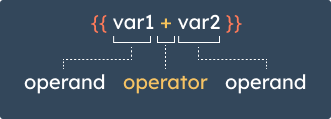 以下は、HubLで使用できる演算子をタイプ別にまとめたものです。
### 数学
標準の算術演算子を使用して、テンプレートのコンテキストで値を計算できます。
```hubl theme={null}
{% set my_num = 11 %}
{% set my_number = 2 %}
{{ my_num + my_number }}
{{ my_num - my_number }}
{{ my_num / my_number }}
{{ my_num % my_number }}
{{ my_num // my_number }}
{{ my_num * my_number }}
{{ my_num ** my_number }}
```
| 記号 | 説明 |
| ---- | --------------------------------------------------------------------------------------- |
| `+` | 2つのオブジェクト(通常は数値)を加算します。文字列やリストを連結させるには、代わりに[`~`演算子](#other-hubl-operators)を使用する必要があります。 |
| `-` | ある数値を別の数値から減算します。 |
| `/` | 数値を除算します。 |
| `%` | 数値を除算した余りを返します。 |
| `//` | 2つの数値を除算した余りを整数に切り捨てて返します。たとえば、`{{ 20 // 7 }}`は`2`です。 |
| `*` | 数値を乗算します。 |
| `**` | 左辺のオペランドを右辺のオペランドで累乗します。 |
### 比較
比較演算子を使用すると、テンプレートロジックに対して値を評価できます。[if文](/cms/reference/hubl/if-statements)で、比較演算子の使用例を確認できます。
```hubl theme={null}
{% set my_num = 11 %}
{% set my_number = 2 %}
{{ my_num == my_number }}
{{ my_num != my_number }}
{{ my_num > my_number }}
{{ my_num >= my_number }}
{{ my_num < my_number }}
{{ my_num <= my_number }}
```
| 記号 | 省略形 | 説明 |
| ---- | --- | --------------------------------------------------- |
| `==` | eq | 次の値に等しい。2つのオブジェクトの値が等しい場合、trueと評価されます。 |
| `!=` | ne | 次の値に等しくない。2つのオブジェクトが等しくない場合、trueと評価されます。 |
| `>` | gt | 次の値より大きい。左辺のオペランドの値が右辺のオペランドの値よりも大きい場合、trueと評価されます。 |
| `>=` | gte | 次の値以上。左辺のオペランドが右辺のオペランドと同じかそれよりも大きい場合、trueと評価されます。 |
| `<` | lt | 次の値より小さい。左辺のオペランドが右辺のオペランドよりも小さい場合、trueと評価されます。 |
| `<=` | lte | 次の値以下。左辺のオペランドが右辺のオペランドと同じかそれより小さい場合、trueと評価されます。 |
短縮形の比較演算子は、[`|selectattr()`](/cms/reference/hubl/filters#selectattr)などの式を評価するHubLフィルターで使用できます。
### 論理
論理演算子を使用すると、ブール式を実装するだけでなく、複数の式を1つのステートメント(文)に結合できます。
```text and.txt theme={null}
Two non-empty strings:
{{ "a" and "b" }}
Empty string and non-empty string:
{{ "" and "b" }}
Two non-zero numbers:
{{ 1 and 2 }}
Zero and non-zero number:
{{ 0 and 1 }}
Two non-empty lists:
{{ [1] and [2] }}
Empty list and non-empty list:
{{ [] and [2] }}
Two non-empty dicts:
{{ {a: 1} and {b: 2} }}
Empty dict and non-empty dict:
{{ {} and {b: 2} }}
```
```text or.txt theme={null}
Two non-empty strings:
{{ "a" or "b" }}
Empty string and non-empty string:
{{ "" or "b" }}
Two non-zero numbers:
{{ 1 or 2 }}
Zero and non-zero number:
{{ 0 or 1 }}
Two non-empty lists:
{{ [1] or [2] }}
Empty list and non-empty list:
{{ [] or [2] }}
Two non-empty dicts:
{{ {a: 1} or {b: 2} }}
Empty dict and non-empty dict:
{{ {} or {b: 2} }}
```
```text is / is not.txt theme={null}
Conditional using `is` operator:
{% set string = "strings are a cat's best friend" %}
{% if string is string_containing "cat" %}
Meow
{% else %}
Woof
{% endif %}
Conditional using `not` operator:
{% set string = "strings are a cat's best friend" %}
{% if string is not string_containing "cat" %}
Meow
{% else %}
Woof
{% endif %}
```
```text (expr).txt theme={null}
{% set my_num = 10 %}
{% set my_variable = 5 %}
{{ (my_num + 2) * my_variable }}
```
```text ?.txt theme={null}
{% set date = local_dt %}
{{ date ? date : 'No date'}}
{{ todays_date ? todays_date : 'No date'}}
```
| 記号 | 説明 |
| -------- | ---------------------------------------------------------------------------------------------------------------------------------------------------------------- |
| `and` | 左辺のオペランドと右辺のオペランドの両方がtruthyの場合に`true`を返します。それ以外の場合は、`false`を返します。
以下は、HubLで使用できる演算子をタイプ別にまとめたものです。
### 数学
標準の算術演算子を使用して、テンプレートのコンテキストで値を計算できます。
```hubl theme={null}
{% set my_num = 11 %}
{% set my_number = 2 %}
{{ my_num + my_number }}
{{ my_num - my_number }}
{{ my_num / my_number }}
{{ my_num % my_number }}
{{ my_num // my_number }}
{{ my_num * my_number }}
{{ my_num ** my_number }}
```
| 記号 | 説明 |
| ---- | --------------------------------------------------------------------------------------- |
| `+` | 2つのオブジェクト(通常は数値)を加算します。文字列やリストを連結させるには、代わりに[`~`演算子](#other-hubl-operators)を使用する必要があります。 |
| `-` | ある数値を別の数値から減算します。 |
| `/` | 数値を除算します。 |
| `%` | 数値を除算した余りを返します。 |
| `//` | 2つの数値を除算した余りを整数に切り捨てて返します。たとえば、`{{ 20 // 7 }}`は`2`です。 |
| `*` | 数値を乗算します。 |
| `**` | 左辺のオペランドを右辺のオペランドで累乗します。 |
### 比較
比較演算子を使用すると、テンプレートロジックに対して値を評価できます。[if文](/cms/reference/hubl/if-statements)で、比較演算子の使用例を確認できます。
```hubl theme={null}
{% set my_num = 11 %}
{% set my_number = 2 %}
{{ my_num == my_number }}
{{ my_num != my_number }}
{{ my_num > my_number }}
{{ my_num >= my_number }}
{{ my_num < my_number }}
{{ my_num <= my_number }}
```
| 記号 | 省略形 | 説明 |
| ---- | --- | --------------------------------------------------- |
| `==` | eq | 次の値に等しい。2つのオブジェクトの値が等しい場合、trueと評価されます。 |
| `!=` | ne | 次の値に等しくない。2つのオブジェクトが等しくない場合、trueと評価されます。 |
| `>` | gt | 次の値より大きい。左辺のオペランドの値が右辺のオペランドの値よりも大きい場合、trueと評価されます。 |
| `>=` | gte | 次の値以上。左辺のオペランドが右辺のオペランドと同じかそれよりも大きい場合、trueと評価されます。 |
| `<` | lt | 次の値より小さい。左辺のオペランドが右辺のオペランドよりも小さい場合、trueと評価されます。 |
| `<=` | lte | 次の値以下。左辺のオペランドが右辺のオペランドと同じかそれより小さい場合、trueと評価されます。 |
短縮形の比較演算子は、[`|selectattr()`](/cms/reference/hubl/filters#selectattr)などの式を評価するHubLフィルターで使用できます。
### 論理
論理演算子を使用すると、ブール式を実装するだけでなく、複数の式を1つのステートメント(文)に結合できます。
```text and.txt theme={null}
Two non-empty strings:
{{ "a" and "b" }}
Empty string and non-empty string:
{{ "" and "b" }}
Two non-zero numbers:
{{ 1 and 2 }}
Zero and non-zero number:
{{ 0 and 1 }}
Two non-empty lists:
{{ [1] and [2] }}
Empty list and non-empty list:
{{ [] and [2] }}
Two non-empty dicts:
{{ {a: 1} and {b: 2} }}
Empty dict and non-empty dict:
{{ {} and {b: 2} }}
```
```text or.txt theme={null}
Two non-empty strings:
{{ "a" or "b" }}
Empty string and non-empty string:
{{ "" or "b" }}
Two non-zero numbers:
{{ 1 or 2 }}
Zero and non-zero number:
{{ 0 or 1 }}
Two non-empty lists:
{{ [1] or [2] }}
Empty list and non-empty list:
{{ [] or [2] }}
Two non-empty dicts:
{{ {a: 1} or {b: 2} }}
Empty dict and non-empty dict:
{{ {} or {b: 2} }}
```
```text is / is not.txt theme={null}
Conditional using `is` operator:
{% set string = "strings are a cat's best friend" %}
{% if string is string_containing "cat" %}
Meow
{% else %}
Woof
{% endif %}
Conditional using `not` operator:
{% set string = "strings are a cat's best friend" %}
{% if string is not string_containing "cat" %}
Meow
{% else %}
Woof
{% endif %}
```
```text (expr).txt theme={null}
{% set my_num = 10 %}
{% set my_variable = 5 %}
{{ (my_num + 2) * my_variable }}
```
```text ?.txt theme={null}
{% set date = local_dt %}
{{ date ? date : 'No date'}}
{{ todays_date ? todays_date : 'No date'}}
```
| 記号 | 説明 |
| -------- | ---------------------------------------------------------------------------------------------------------------------------------------------------------------- |
| `and` | 左辺のオペランドと右辺のオペランドの両方がtruthyの場合に`true`を返します。それ以外の場合は、`false`を返します。
この演算子は、Pythonの`and`演算子やJavaScriptの`&&`演算子のようには動作しません。`and`演算子の使用の詳細については、以下をご覧ください。 |
| `or` | 第1オペランドがtruthyの場合に、そのオペランドを返します。それ以外の場合は、第2オペランドを返します。
この演算子は、PythonおよびJavaScriptの`or`に \|\| 相当します。`or`演算子の使用の詳細については、以下をご覧ください。 |
| `is` | 肯定文の2つのオペランドを結合します。 |
| `not` | ステートメント(文)を`is`と組み合わせて否定します。 |
| `(expr)` | 演算順を示すために、式をグループ化します。例:`(10 - 2) * variable`。 |
| `?` | [三項演算子](/cms/reference/hubl/if-statements)を使用すると、条件付きロジックをすばやく記述できます。3つの引数(式、true条件、false条件)を受け入れます。式を評価し、該当した条件を返します。 |
**AND/OR演算子の使用**
HubLでは、`or`演算子はPythonの`or`演算子やJavaScriptの`||`演算子のように動作します。式がtrueと評価された場合は第1オペランドを返し、それ以外の場合は第2オペランドを返します。`or`演算子の一般的な使用例は、変数値が定義されていない場合のフォールバック値の設定です。
```hubl theme={null}
Two non-empty strings:
{{ "a" or "b" }}
Empty string and non-empty string:
{{ "" or "b" }}
Defining a fallback value:
{{ some_variable or "default value" }}
```
ただし、`and`演算子は、Pythonの`and`演算子やJavaScriptの`&&`演算子とは異なる動作をします。HubLでは、`and`は常にブール値を返します。式がtrueと評価された場合は`true`が返され、それ以外の場合は`false`が返されます。一方、PythonとJavaScriptの演算子は、ステートメント(文)がtrueとfalseのどちらとして評価されるかに基づいてオペランド値を返します。
```hubl theme={null}
Two non-empty strings:
{{ "a" and "b" }}
Empty string and non-empty string:
{{ "" and "b" }}
```
HubLでは、空のリスト(`[]`)と空のディクショナリー(`{}`)はfalsyと見なされます。これはPythonでの動作と同等ですが、`[]`と`{}`がtruthyであるJavaScriptとは異なります。
```hubl theme={null}
Empty list and non-empty list:
{{ [] or [2] }}
Empty dict and non-empty dict:
{{ {} and {b: 2} }}
```
### その他のHubL演算子
以下に、さまざまなタスクを実行するために使用できる、その他の重要なHubL演算子を示します。
| 記号 | 説明 |
| --------------- | --------------------------------------------------------------------------------- |
| `in` | 値がシーケンス内に含まれているかどうかをチェックします。 |
| `is` | [式評価](/cms/reference/hubl/operators-and-expression-tests#expression-tests)を実行します。 |
| \| | フィルターを適用します。 |
| `~` | 値を連結します。 |
## 式評価
式評価は、論理演算子を使用して評価できる各種のブール条件です。
### boolean
オブジェクトがブール値かどうかを評価します(厳密なチェックであり、truthy式の評価ではありません)。
```text hubl.txt theme={null}
{% set isActive = false %}
{% if isActive is boolean %}
isActive is a boolean
{% endif %}
```
```text 出力のレンダリング.txt theme={null}
isActive is a boolean
```
### containing
変数のリストに値が含まれているかどうかを評価します。
```text hubl.txt theme={null}
{% set numbers = [1, 2, 3] %}
{% if numbers is containing 2 %}
Set contains 2!
{% endif %}
```
```text 出力のレンダリング.txt theme={null}
Set contains 2!
```
### containingall
変数のリストに別のリストの全ての値が含まれているかどうかを評価します。
```text hubl.txt theme={null}
{% set numbers = [1, 2, 3] %}
{% if numbers is containingall [2, 3] %}
Set contains 2 and 3!
{% endif %}
{% if numbers is containingall [2, 4] %}
Set contains 2 and 4!
{% endif %}
```
```text 出力のレンダリング.txt theme={null}
Set contains 2 and 3!
```
### defined
変数がテンプレートのコンテキスト内で定義済みかどうかを評価します。演算子を使わずにif文を記述してこの式評価を使用することもできますが、その場合は既定で、変数が定義されているかどうかだけがチェックされます。
以下の例では、カラーモジュールのcolorパラメーターがテストされます。Colorパラメーターに値がない場合、テンプレートは既定の背景色として黒をレンダリングします。値が定義されている場合、ユーザーが設定した背景色がテンプレートによってレンダリングされます。
```text hubl.txt theme={null}
{% color "my_color" color="#930101", export_to_template_context=True %}
```
```html example.html theme={null}
```
### divisibleby
オブジェクトを別の数値で割り切れるかどうかを評価します。
例えば、以下のforループは、動物の種類のリストを反復処理するために作成されています。動物の各種類がdiv内に出力され、5つ目ごとのdivに異なるインラインスタイルが適用されます(幅: 100%)。このコンセプトをブログに適用すると、特定のパターンの記事に別のマークアップをレンダリングできます。Forループとloop.indexの詳細については、[こちらの記事を参照してください](/cms/reference/hubl/loops)。
```text hubl.txt theme={null}
{% set animals = ["lions", "tigers", "bears", "dogs", "sharks"] %}
{% for animal in animals %}
{% if loop.index is divisibleby 5 %}
{{animal}}
{% else %}
{{animal}}
{% endif %}
{% endfor %}
```
```html example.html theme={null}
lions
tigers
bears
dogs
sharks
```
### equalto
変数の値が定数または別の変数の値と等しいかどうかを評価します。これと同じ評価は、`==`演算子を使用して行うこともできます。
以下の例では、ループ内の投稿の合計数に応じてブログ記事の幅を調整します。この出力例では、ブログに4件の記事があると仮定しています。
```html example.html theme={null}
{% for content in contents %}
{% if loop.length is equalto 2 %}
Post content
{% elif loop.length is equalto 3 %}
Post content
{% elif loop.length is equalto 4 %}
Post content
{% else %}
Post content
Post content
Post content
Post content
```
### even
数値型変数の値が偶数かどうかを評価します。
以下の例は、単純化したブログリストのループを示しています。この例では、ループの現在の反復処理での値が偶数の場合、その投稿アイテムのdivに`even-post`クラスを割り当てます。それ以外の場合は、`odd-post`クラスを割り当てます。
```html example.html theme={null}
{% for content in contents %}
{% if loop.index is even %}
Post content
{% else %}
Post content
{% endif %}
{% endfor %}
```
```html example.html theme={null}
Post content
Post content
Post content
Post content
```
### float
数値型変数の値が浮動小数点数かどうかを評価します。
```html example.html theme={null}
{% set quantity = 1.20 %}
{% if quantity is float %}
quantity is a floating point number
{% endif %}
```
```html example.html theme={null}
quantity is a floating-point number
```
### integer
変数が整数かどうかを評価します。
```html example.html theme={null}
{% set quantity = 120 %}
{% if quantity is integer %}
Quantity is an integer
{% endif %}
```
```html example.html theme={null}
Quantity is an integer
```
### iterable
変数がループ処理を適用できるかどうかを評価します。
以下の例では、`jobs`という変数が反復可能かどうかをチェックします。この変数にジョブのリストが格納されている場合、[if文](/cms/reference/hubl/if-statements)が`true`と評価されて、ループが実行されます。変数に1つの値しか格納されていない場合は、if文により、別のマークアップを使用してその値が出力されます。[ループの詳細については、こちらを参照してください](/cms/reference/hubl/loops)。
```html example.html theme={null}
{% set jobs = ["Accountant", "Developer", "Manager", "Marketing", "Support"] %}
{% if jobs is iterable %}
Available positions
{% for job in jobs %}
- {{ job }}
{% endfor %}
{% else %}
Available position
{{ jobs }}
{% endif %}
```
```html example.html theme={null}
Available positions
- Accountant
- Developer
- Manager
- Marketing
- Support
```
### lower
文字列が小文字かどうかを評価します。
以下の例では、[unless文](/cms/reference/hubl/if-statements#unless-statements)と小文字フィルターを使用して、テキストモジュールに入力されるテキストの文字列が常に小文字になるようにしています。
```html example.html theme={null}
{% module "my_text" path="@hubspot/text" label="Enter text", value="Some TEXT that should be Lowercase", export_to_template_context=True %}
{% unless widget_data.my_text.value is lower %}
{{ widget_data.my_text.value|lower }}
{% endunless %}
```
```text 出力のレンダリング.txt theme={null}
some text that should be lowercase
```
### mapping
オブジェクトがディクショナリー(辞書型)かどうかを評価します。
以下の例では、contactオブジェクトが辞書型かどうかをチェックしています。
```html example.html theme={null}
{% if contact is mapping %}
This object is a dictionary.
{% else %}
This object is not a dictionary.
{% endif %}
```
```text 出力のレンダリング.txt theme={null}
This object is a dictionary.
```
### none
変数に`null`値があるかどうかを評価します。
```html example.html theme={null}
{% module "user_email" path="@hubspot/text" label="Enter user email", value="example@hubspot.com", export_to_template_context=True %}
{% unless widget_data.user_email.value is none %}
{{ widget_data.user_email.value }}
{% endunless %}
```
```text 出力のレンダリング.txt theme={null}
example@hubspot.com
```
### number
変数の値が数値かどうかを評価します。
以下の例では、変数をチェックして、数かどうかを調べ、数の場合は百万に変換します。
```html example.html theme={null}
{% set my_var = 40 %}
{% if my_var is number %}
{{ my_var * 1000000 }}
{% else %}
my_var is not a number.
{% endif %}
```
```text 出力のレンダリング.txt theme={null}
40000000
```
### odd
数値型変数の値が奇数かどうかを評価します。
以下の例は、前述のeven式評価の例の逆バージョンです。
```html example.html theme={null}
{% for content in contents %}
{% if loop.index is odd %}
Post content
{% else %}
Post content
{% endif %}
{% endfor %}
```
```html example.html theme={null}
Post content
Post content
Post content
Post content
```
### sameas
2つの変数の値が同じかどうかを評価します。
以下の例では、2つの変数を設定してから、これらの変数の値が同じかどうかをチェックします。
```text hubl.txt theme={null}
{% set var_one = True %}
{% set var_two = True %}
{% if var_one is sameas var_two %}
The variables values are the same.
{% else %}
The variables values are different.
{% endif %}
```
```text 出力のレンダリング.txt theme={null}
The variables values are the same.
```
### sequence
**iterable**評価と同様に、この式評価では変数がシーケンスかどうかをチェックします。
以下の例では、変数がシーケンスかどうかを評価してから、音楽ジャンルのシーケンスを反復処理します。
```html example.html theme={null}
{% set genres = ["Pop", "Rock", "Disco", "Funk", "Folk", "Metal", "Jazz", "Country", "Hip-Hop", "Classical", "Soul", "Electronica" ] %}
{% if genres is sequence %}
Favorite genres
{% for genre in genres %}
- {{ genre }}
{% endfor %}
{% else %}
Favorite genre:
{{ genres }}
{% endif %}
```
```html example.html theme={null}
- Pop
- Rock
- Disco
- Funk
- Folk
- Metal
- Jazz
- Country
- Hip-Hop
- Classical
- Soul
- Electronica
```
### string
変数の値が文字列であるかどうかを評価します。
以下の例では、変数をチェックして、それが文字列かどうかを調べます、文字列の場合はタイトルフィルターを適用して大文字に変更します。
```text hubl.txt theme={null}
{% set my_var = "title of section" %}
{% if my_var is string %}
{{ my_var|title }}
{% else %}
my_var is not a string
{% endif %}
```
```text 出力のレンダリング.txt theme={null}
Title Of Section
```
### string\_containing
指定された部分文字列が別の文字列に含まれているかどうかを評価します。この式評価は`is`演算子と組み合わせて使用します。
```text hubl.txt theme={null}
{% if content.domain is string_containing ".es" %}
Markup that will only render on content hosted on .es domains
{% elif content.domain is string_containing ".jp" %}
Markup that will only render on content hosted on .jp domains
{% else %}
Markup that will render on all other domains
{% endif %}
```
```text 出力のレンダリング.txt theme={null}
Markup that will render on all other domains
```
### string\_startingwith
文字列が特定の文字列で始まるかどうかを評価します。`is`演算子と組み合わせて使用します。
```text hubl.txt theme={null}
{% if content.slug is string_startingwith "es/" %}
Markup that will only render on content hosted in a /es/ subdirectory
{% elif content.slug is string_startingwith "jp/" %}
Markup that will only render on content hosted in a /jp/ subdirectory
{% else %}
Markup that will render on all subdirectories
{% endif %}
```
```text 出力のレンダリング.txt theme={null}
Markup that will render on all subdirectories
```
### truthy
式が`True`として評価されるかどうかを評価します。
以下の例では、ブール値チェックボックスモジュールを使用してアラートメッセージを表示します。
```html example.html theme={null}
{% boolean "check_box" label="Show alert", value=True, export_to_template_context=True %}
{% if widget_data.check_box.value is truthy %}
Danger!
{% endif %}
```
```html example.html theme={null}
Danger!
```
### undefined
テンプレートのコンテキスト内で変数が未定義かどうかを評価します。この評価は`none`式評価とは異なります。undefined式評価で`true`が返されるのは、変数が存在しても値が格納されていない場合です。一方、none式評価では変数にnull値が格納されている場合に`true`が返されます。
以下の例では、テンプレートで変数"my\_var"の有無をチェックします。
```text hubl.txt theme={null}
{% if my_var is undefined %}
A variable named "my_var" does not exist on this template.
{% else %}
{{ my_var }}
{% endif %}
```
```text 出力のレンダリング.txt theme={null}
A variable named "my_var" does not exist on this template.
```
### upper
文字列がすべて大文字かどうかを評価します。以下の例は、[前述](#lower)の`lower`式評価の例の逆バージョンです。
```text hubl.txt theme={null}
{% module "my_text" path="@hubspot/text" label="Enter text", value="Some TEXT that should be Uppercase", export_to_template_context=True %}
{% unless widget_data.my_text.value is upper %}
{{ widget_data.my_text.value|upper }}
{% endunless %}
```
```text 出力のレンダリング.txt theme={null}
SOME TEXT THAT SHOULD BE UPPERCASE
```
### within
変数がリスト内に存在するかどうかを評価します。
```text hubl.txt theme={null}
{% set numbers = [1, 2, 3] %}
{% if 2 is within numbers %}
2 is in the list!
{% endif %}
{% if 4 is within numbers %}
4 is in the list!
{% endif %}
```
```text 出力のレンダリング.txt theme={null}
2 is in the list!
```